
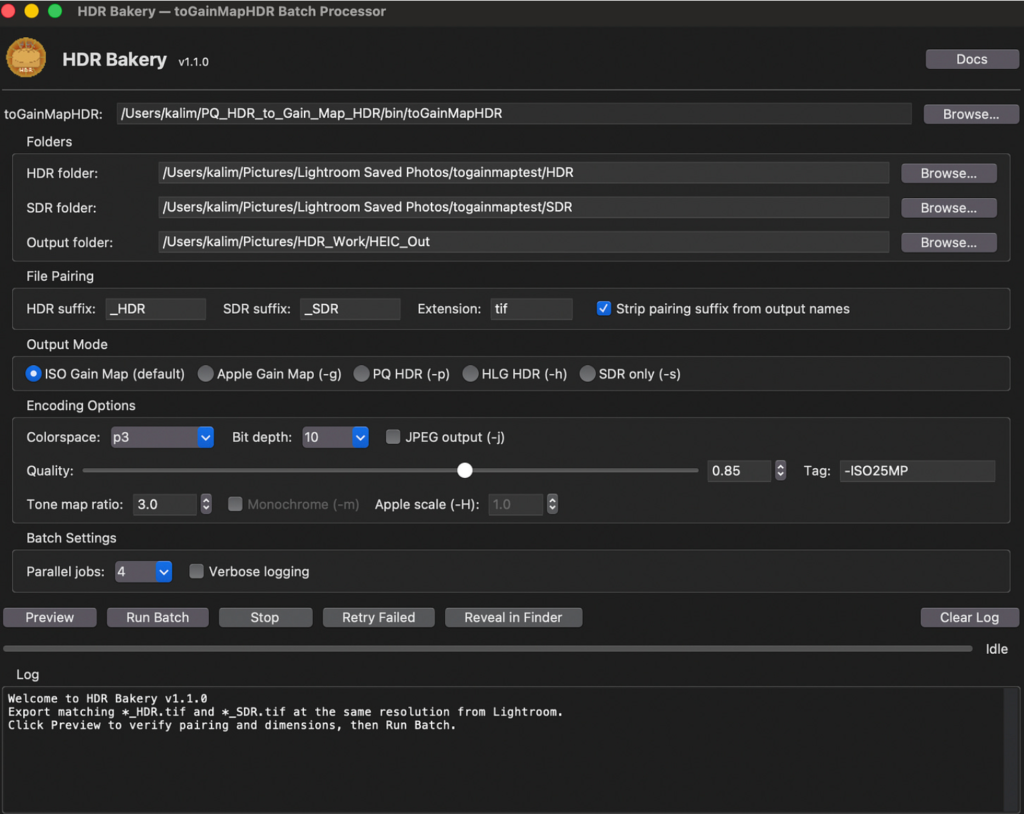
I recently came back from a family vacation with hundreds of photos from my Nikon Z8 camera and hit a frustrating problem: getting HDR photos that weren’t shot on an iPhone to display consistently across Apple apps (Photos, iMessage, Shared Albums) is surprisingly painful. ChatGPT 5.2 helped me find a command-line tool that converts Adobe Lightroom exports into Apple-friendly HDR HEIC using an ISO gain map, guided me to the settings that actually match Lightroom, and then one-shotted a GUI app in under a minute. I polished it with Claude. The result is HDR Bakery: a batch processor that turns my Z8 Lightroom edits into HDR HEICs that work in Apple land.
The Problem
I’m an avid photographer. Well, I used to be. Very early in my career I almost left engineering to pursue photography full time. I still shoot, but these days it’s mostly of our two-year-old son (and occasionally cars, a story for another day).
My camera is a Nikon Z8, an amazing mirrorless camera typically paired with a 24-70 f/2.8 or a 50 f/1.8 lens. One of the reasons it’s so good is its very large dynamic range: the ability to capture detail in both shadows and highlights in the same scene. The Z8 RAW file format captures enough range to render photos as HDR (high dynamic range).
I edit these RAW photos in Adobe Lightroom, then export them into a more portable file format to share with family and friends who are all iPhone users, except for my green message bubble friends (you know who you are).
And this is where the frustration begins.
We’ve all been spoiled by iPhone HDR for years. But sharing RAW photos through typical workflows compresses highlights back into SDR (standard dynamic range), making images look flatter than what you see in real life or in Lightroom. I can shoot a gorgeous scene on a more capable camera, and once I export and share it, it looks worse than photos shot with an iPhone.
The obvious answer is to export to one of Lightroom’s HDR formats. But Apple does not treat every HDR format consistently across Photos, iMessage, and Shared Albums. Something can look perfect in one place and broken or muted in another. And Adobe still doesn’t export the one format Apple handles best across all its apps: HDR HEIC with an ISO gain map.
A gain map is an SDR base image plus metadata that tells HDR displays how to scale brightness (especially highlights) based on the screen’s headroom. Non-HDR displays just show the base. HDR displays apply the map proportionally based on what the screen can do. It’s the format iPhones use natively. Apple calls it “Adaptive HDR” and in my testing, it was the most reliable way to get consistent results across Photos, iMessage, and Shared Albums.
How AI Got Me There
After a lot of back-and-forth with ChatGPT, I was guided towards a CLI tool called toGainMapHDR (chemharuka) that converts images into gain map HDR HEIC. ChatGPT was particularly good here at the research and discovery phase. It found the tool, understood which flags mattered, and helped me iterate through conversion attempts until the output actually matched what Lightroom showed me.
The pipeline that works: export two matched TIFFs from Lightroom (same crop, same pixel dimensions):
- HDR TIFF (HDR export ON)
- SDR TIFF (HDR export OFF)
Then convert with the SDR TIFF as the explicit base and the HDR TIFF as the source, because if the converter invents its own base via tone mapping, the result often looks muted compared to Lightroom’s HDR preview:
toGainMapHDR “<HDR.tif>” “<OUT_DIR>” \
-b “<SDR.tif>” \
-c p3 -d 10 -q 0.85
Once I did that, it finally worked the way it should: looks like Lightroom HDR, displays correctly in Photos, shares correctly via iMessage, doesn’t get mangled in Shared Albums.
And yes, I felt ridiculous that this was what it took.
From CLI to GUI
At this point I had a working pipeline and wanted to batch it. I asked ChatGPT for a script. It made one. Then I decided I wanted a GUI. Note: a GUI already exists online, but it doesn’t expose the options I needed, specifically the explicit SDR base pairing that makes the whole workflow work.
So I asked this one-shot prompt:
Can you create me a GUI that accepts source folder, target folder, and exposes the key configuration options?
Given the prompt, I wasn’t expecting much. But ChatGPT produced a complete, working application on the first try from context alone. No mockups, wireframes, or requirements list. It understood what I needed because we’d spent the conversation figuring out the problem together.
I then moved to Claude for code refinement: restructuring the architecture, adding tooltips for every CLI flag, dimension mismatch detection, output validation, config persistence, and a built-in documentation window. In this project, ChatGPT was best for research, discovery, and prototyping, while Claude was best for iterative refactors across the same codebase.
The result is HDR Bakery. I can now export and share HDR photos from our vacation with my family. They look great on everyone’s iPhone. And they’ll never know how ridiculous the process was or why it’s such a big deal.